
Complete Guide to Digital Visitor Management Systems for Gated Communities

Connected Hood Team
The Connected Hood team shares expert insights on society management and community living in India.January 6, 2026
8 min read
Learn how digital visitor management systems work, their benefits over paper registers, and how to implement one in your housing society effectively.
#Complete Guide to Digital Visitor Management Systems for Gated Communities
Security ranks as the number one priority for residents in Indian gated communities. Yet, most housing societies still rely on paper registers at the gate—a practice that offers an illusion of security without delivering real protection. Studies indicate that over 60% of security incidents in residential complexes involve gaps in visitor verification, many of which could have been prevented with proper digital systems.
This comprehensive guide explains how digital visitor management works, why it is superior to traditional methods, and how your society can implement a modern system effectively.
#Traditional vs Digital Visitor Management: A Clear Comparison
#The Paper Register Problem
Walk into most housing society gates and you will find a worn register where visitors scribble barely legible names and phone numbers. This system fails in multiple ways:
Verification gaps:
- Guards cannot verify if the visitor is actually expected
- No confirmation from the resident before entry
- Easy to provide false information
Record keeping issues:
- Handwriting often unreadable
- Registers get damaged, lost, or full
- No searchable database for investigations
- No photos attached to entries
Operational inefficiencies:
- Long queues during peak hours
- Guards juggling register and security duties
- No way to track exit times accurately
- VIP visitors treated the same as unknown guests
Security vulnerabilities:
- Former domestic help can claim to still work in the society
- Visitors can avoid signing out
- No audit trail for incidents
- Guards can be pressured to skip procedures
#How Digital Visitor Management Changes Everything
A modern digital visitor management system (DVMS) transforms the entry experience for residents, visitors, and security staff alike.
For residents:
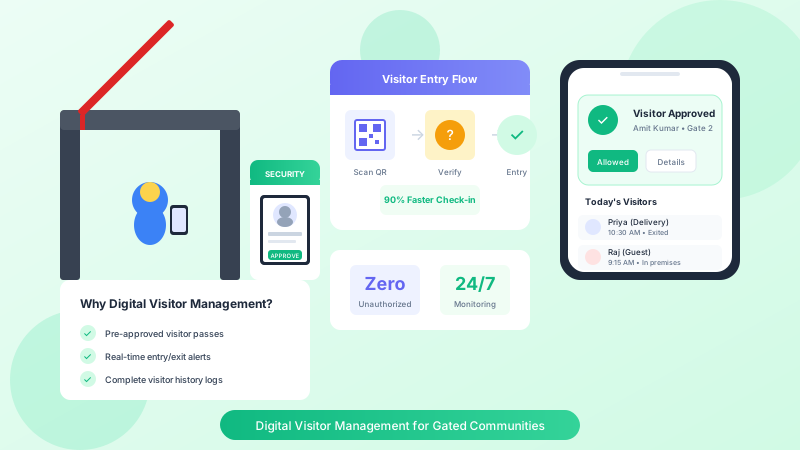
- Pre-approve visitors from your phone before they arrive
- Receive instant notifications when someone arrives for you
- Deny entry remotely to unexpected visitors
- Maintain a list of approved frequent visitors
- Review entry history of who visited your flat
For security guards:
- Clear instructions on whether to allow or hold visitors
- Automatic alerts for denied visitors or flagged individuals
- Photo capture creates visual record
- Reduced confrontation with visitors (system decides, not guard)
- Digital records eliminate paperwork
For the management committee:
- Complete audit trail of all entries
- Analytics on visitor patterns
- Evidence for security incidents
- Compliance with safety protocols
- Reduced liability through documented procedures
#Key Features of an Effective Digital Visitor Management System
#1. Pre-Registration and Approval
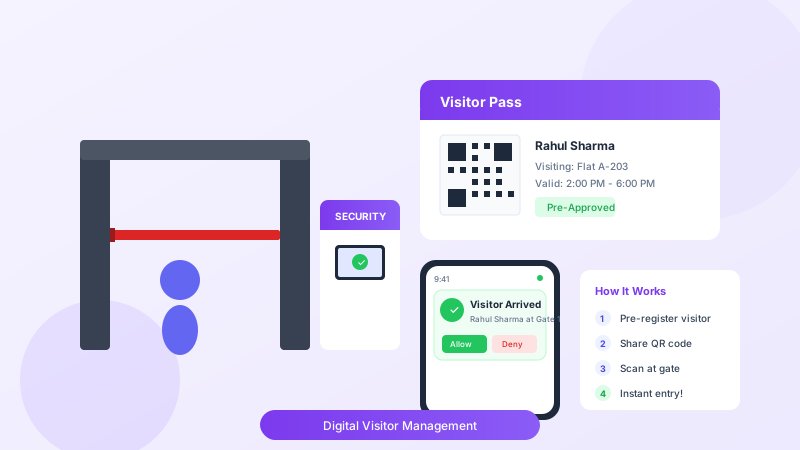
The cornerstone of digital visitor management is the ability for residents to pre-authorize visits.
How it works:
- Resident creates a visitor entry in the app with name, phone, and expected time
- System generates a unique code or QR code
- Resident shares the code with the visitor
- Visitor shows code at gate for instant verification
- Guard scans or enters code, confirming the visit
- Resident receives notification of arrival
Benefits:
- No awkward calls to confirm visitors
- Faster entry for expected guests
- Clear audit trail of who authorized entry
- Reduces social engineering attacks
#2. Real-Time Notifications
Instant alerts keep residents informed and in control.
Notification types:
- Visitor arrived at gate
- Visitor approved and entering
- Visitor denied and turned away
- Delivery personnel waiting
- Guest checked out
Channels:
- Push notifications (most common)
- SMS alerts (backup for non-smartphone users)
- Intercom calls (for immediate verification)
#3. Visitor Categories and Handling
Different visitors require different protocols.
Guest visitors:
- Full verification with resident approval
- Photo captured at entry
- Entry and exit times logged
Delivery personnel:
- Quick entry for known services (Amazon, Swiggy, Zomato)
- Notification to resident
- Shorter allowed stay duration
- Exit verification important
Domestic staff:
- Pre-registered with photos and ID
- Regular attendance tracking
- Background verification records stored
- Easy termination when they leave employment
Service providers:
- Plumbers, electricians, maintenance workers
- Work order association when possible
- Verification of company credentials
- Escort requirements for certain areas
Frequent visitors:
- Parents, close friends, regular guests
- Simplified entry with stored profiles
- Resident can set automatic approval
#4. Guard Interface and Tools
The system must work for security personnel, who are often not tech-savvy.
Essential guard features:
- Simple interface with large buttons
- Vernacular language support (Hindi, regional languages)
- Works on basic smartphones
- Quick manual entry when needed
- Camera integration for photos
- Panic button for emergencies
Guard workflow:
- Ask visitor whom they are visiting
- Search resident or flat number
- Send notification or scan pre-approved code
- Capture visitor photo
- Wait for resident approval or denial
- Print pass or allow entry
- Log exit when visitor leaves
#5. Reporting and Analytics
Data from visitor logs enables better security decisions.
Useful reports:
- Daily, weekly, monthly entry summaries
- Peak hours analysis
- Frequent visitors to the society
- Denied entries and reasons
- Average visit durations
- Guard performance metrics
#Implementation Guide for Your Society
#Phase 1: Preparation (2-4 weeks)
Assess current state:
- Document existing visitor management process
- Identify pain points and security gaps
- Survey residents on expectations
- Evaluate guard capabilities
Define requirements:
- Expected visitor volume
- Integration needs (intercom, CCTV)
- Budget constraints
- Timeline expectations
Select a solution:
- Compare vendors against requirements
- Check references from similar societies
- Negotiate pricing and terms
- Plan for pilot testing
#Phase 2: Setup (1-2 weeks)
Technical setup:
- Install guard devices (tablets or phones)
- Configure visitor categories and rules
- Set up notification preferences
- Test integration points
Data migration:
- Upload resident database
- Import domestic staff records
- Configure frequent visitor lists
- Set up committee admin access
Training:
- Train security guards thoroughly
- Create quick reference guides
- Prepare FAQs for residents
- Designate super-users for support
#Phase 3: Rollout (2-4 weeks)
Soft launch:
- Start with one gate or one tower
- Run parallel with existing system initially
- Gather feedback aggressively
- Fix issues immediately
Full deployment:
- Expand to all entry points
- Retire paper registers
- Monitor adoption rates
- Address resistance patiently
Communication:
- Send detailed instructions to all residents
- Hold Q&A sessions for questions
- Share quick-start videos
- Provide support contact for issues
#Phase 4: Optimization (Ongoing)
Monitor and improve:
- Review weekly reports
- Address recurring complaints
- Update visitor categories as needed
- Retrain guards periodically
#Common Challenges and Solutions
#Challenge: Residents not adopting the system
Solution: Make it easier than calling the guard. Ensure notifications are instant and app is user-friendly. For elderly residents, allow family members to approve on their behalf.
#Challenge: Guards bypassing the system
Solution: Make compliance easy and non-compliance obvious. Regular audits of manual vs digital entries. Positive reinforcement for good usage.
#Challenge: Delivery surge during peak hours
Solution: Create express lanes for verified delivery services. Pre-approve regular delivery slots. Consider dedicated delivery collection points.
#Challenge: Network connectivity issues
Solution: Ensure good WiFi at guard posts. Have SMS backup for notifications. Allow offline mode with sync capability.
#Measuring Success
Track these metrics to evaluate your digital visitor management system:
| Metric | Before DVMS | Target After | |--------|-------------|--------------| | Average entry time | 3-5 minutes | Under 1 minute | | Unverified entries | 20-30% | Under 5% | | Resident complaints about security | Regular | Rare | | Guard time on paperwork | 40%+ | Under 10% | | Incident investigation time | Hours/days | Minutes |
#Frequently Asked Questions
#What about visitors who do not have smartphones?
Guards can make calls to residents from the guard post. The resident can approve via app while the guard enters visitor details manually.
#How does this work for large events like parties?
Residents can create bulk visitor lists for events. Some systems allow sharing a single event code that multiple guests can use.
#What if the network goes down?
Good systems have offline modes where guards can record entries locally and sync when connectivity returns. SMS notifications serve as backup.
#Is resident data safe?
Choose vendors that comply with data protection standards, use encryption, and have clear privacy policies. Residents should control what information is visible to whom.
#How much does digital visitor management cost?
Costs vary from Rs. 2,000 to Rs. 10,000 per month depending on features and society size. Hardware costs (tablets, cameras) are usually one-time expenses.
Ready to Transform Your Society Management?
Connected Hood makes managing your residential community effortless. From visitor management to billing automation, experience the difference.
#Conclusion
Digital visitor management is not a luxury—it is a necessity for any housing society serious about security. The paper register era is ending, and communities that adapt will enjoy better security, happier residents, and more efficient operations.
The initial investment in time and money pays off through improved safety, reduced guard workload, and the peace of mind that comes from knowing exactly who enters your community and when.
Is your society ready to upgrade its visitor management? Connected Hood offers a comprehensive digital visitor management system designed specifically for Indian housing societies. Explore our features and see how we can enhance your community's security.
Related Articles
Delivery Management in Gated Communities: Best Practices for 2026
How Smart Entry Systems Improve Gated Community Security
Why Gated Communities Need Digital Visitor Management Systems