
How to Choose the Right Society Management Software: A Buyer's Guide

Connected Hood Team
The Connected Hood team shares expert insights on society management and community living in India.January 22, 2026
11 min read
A comprehensive guide to evaluating and selecting society management software for your housing society, with checklists, comparison criteria, and red flags to avoid.
#How to Choose the Right Society Management Software: A Buyer's Guide
Selecting society management software is one of the most impactful decisions a management committee can make. The right choice transforms operations, delights residents, and makes volunteer work sustainable. The wrong choice wastes money, creates frustration, and sets back digital adoption by years.
With dozens of options in the Indian market—from local startups to global platforms—how do you make the right choice? This comprehensive buyer's guide walks you through the evaluation process, essential criteria, pricing considerations, and warning signs to avoid.
#Before You Start: Understanding Your Requirements
#Conduct a Needs Assessment
Before looking at any software, understand what problems you are trying to solve.
Gather stakeholder input:
- Committee members: What administrative tasks consume the most time?
- Residents: What services do they wish were easier?
- Security staff: What would help them do their jobs better?
- Accountant/auditor: What reporting and compliance needs exist?
Document current processes:
- How is billing currently done?
- How are complaints handled?
- How do visitors enter the society?
- How are amenities booked?
- How does communication happen?
Identify pain points:
- Which processes cause the most complaints?
- Where does the most time get wasted?
- What information is hardest to access?
- What creates the most conflict?
#Prioritize Your Requirements
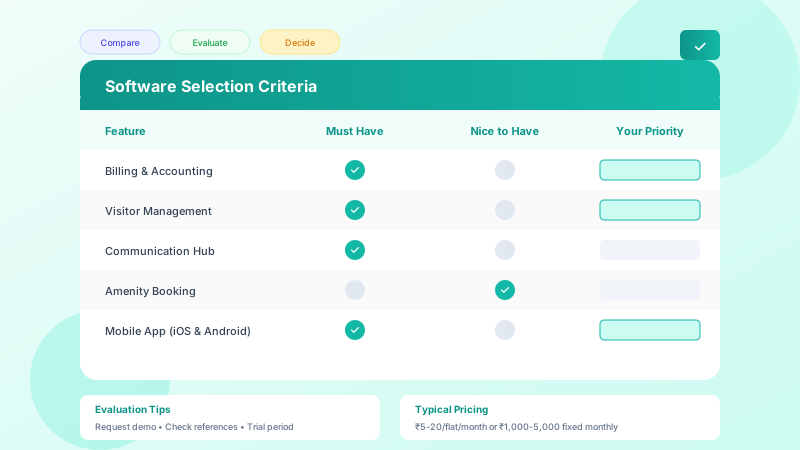
Not all features matter equally. Categorize your needs:
Must-have (deal-breakers):
- Features you absolutely need
- Problems that must be solved
- Example: Online payment collection, visitor management
Should-have (important):
- Features that would significantly help
- Not critical but highly valuable
- Example: Amenity booking, document storage
Nice-to-have (bonus):
- Features that would be useful sometimes
- Not essential for initial adoption
- Example: Vendor marketplace, social features
#Understand Your Constraints
Budget:
- What can the society afford monthly/annually?
- Is there budget for one-time setup costs?
- Who approves the expense?
Technical infrastructure:
- Internet connectivity at gate and office
- Devices available (tablets, phones)
- IT support availability
User capabilities:
- Tech comfort of committee members
- Diversity of resident demographics
- Language requirements
#Essential Evaluation Criteria
#1. Core Feature Set
Evaluate each must-have feature thoroughly:
Billing and Accounting | Criteria | Questions to Ask | |----------|------------------| | Bill generation | Can it handle your billing complexity (area-based, slab-based, mixed)? | | Payment collection | Which payment methods are supported? What are transaction fees? | | Reconciliation | Does it auto-match bank statements? | | Reports | Can it generate the reports your auditor needs? | | GST compliance | If applicable, does it handle GST invoicing? |
Visitor Management | Criteria | Questions to Ask | |----------|------------------| | Pre-approval | Can residents pre-approve visitors easily? | | Guard interface | Is the guard app simple enough for your security staff? | | Notifications | Are alerts real-time? Multiple channels? | | Records | How long is visitor data retained? Is it searchable? | | Delivery handling | Are there specific features for food and package delivery? |
Communication | Criteria | Questions to Ask | |----------|------------------| | Channels | Push, SMS, email, in-app—which are supported? | | Targeting | Can you send to specific wings, floors, groups? | | Moderation | Can you control who posts and what content is allowed? | | History | Are communications archived and searchable? |
Complaint Management | Criteria | Questions to Ask | |----------|------------------| | Submission | Can residents submit easily with photos and details? | | Routing | Are complaints automatically assigned to the right person? | | Tracking | Can residents see status without asking? | | Analytics | Can you identify patterns and measure resolution time? |
#2. User Experience
A feature-rich app that nobody uses is worthless. Evaluate usability:
For residents:
- Download the app and try to complete common tasks
- Is navigation intuitive?
- Can elderly or non-tech-savvy residents use it?
- Is it available in relevant languages?
For committee members:
- Try the admin dashboard
- Can you find information quickly?
- Are bulk operations supported?
- Is training required or is it self-explanatory?
For security staff:
- Test the guard interface
- Can it be used quickly during busy periods?
- Does it work offline?
- Is it available in Hindi or regional languages?
#3. Reliability and Performance
Uptime:
- What is the vendor's uptime commitment?
- What compensation is offered for downtime?
- Is there a status page for checking system health?
Speed:
- How quickly do pages load?
- Are notifications truly real-time?
- Does performance degrade with data growth?
Offline capability:
- What works without internet?
- How does data sync when connectivity returns?
- Are critical functions like gate entry offline-capable?
#4. Security and Privacy
Your society app handles sensitive data—financial records, resident information, visitor logs. Security is non-negotiable.
Data protection:
- Where is data stored? (India-based servers preferred)
- What encryption is used?
- Who has access to data?
- What is the data retention policy?
Access control:
- Can you set different permission levels?
- Is there audit logging of administrative actions?
- How are passwords protected?
Compliance:
- Is the vendor compliant with applicable data protection regulations?
- Can you get data export if you switch vendors?
- What happens to data if the vendor shuts down?
#5. Support and Training
Onboarding:
- Is data migration assistance provided?
- Is training included for committee members?
- Are training materials available for residents?
- How long does typical onboarding take?
Ongoing support:
- What support channels are available (phone, chat, email)?
- What are support hours?
- What is typical response time?
- Is support in Hindi/regional languages available?
Self-service resources:
- Is documentation comprehensive?
- Are video tutorials available?
- Is there a community forum?
- Are FAQs regularly updated?
#6. Vendor Stability and Reputation
Choosing a vendor that might not exist in two years is risky.
Company assessment:
- How long has the company been operating?
- What is their funding situation?
- How many societies do they serve?
- Are they growing or struggling?
Reference checks:
- Ask for references from societies similar to yours
- Speak to current customers independently
- Check online reviews and ratings
- Ask about complaints and how they were resolved
Industry presence:
- Do they participate in industry events?
- Are they members of relevant associations?
- Do they publish thought leadership content?
- Are they recommended by property managers?
#Pricing Models and Considerations
#Common Pricing Structures
Per flat per month:
- Typical range: Rs. 5-20 per flat per month
- Scales with society size
- Predictable for budgeting
- Watch for minimum commitments
Fixed monthly fee:
- Typical range: Rs. 1,000-5,000 per month
- Better for smaller societies
- May have flat-count limits
- Simpler to understand
Annual subscription:
- Usually offers discount over monthly
- Larger upfront commitment
- Lock-in considerations
- Cancellation terms important
Transaction-based:
- Fee per payment processed
- Can be significant for large societies
- Compare against gateway rates
- Hidden cost if not careful
Freemium:
- Basic features free
- Premium features paid
- Good for trial
- May be limiting long-term
#Total Cost of Ownership
Look beyond subscription fees:
Setup costs:
- Data migration fees
- Training costs
- Hardware requirements (tablets, cameras)
- Integration costs
Ongoing costs:
- Subscription fees
- Transaction fees on payments
- SMS charges for notifications
- Support tier upgrades
Hidden costs:
- Charges for additional features
- Fees for extra users
- Storage limits and overage
- API access fees
#Calculating ROI
Justify the investment with concrete benefits:
Direct savings:
- Reduced accounting time (value at hourly rate)
- Lower communication costs (vs SMS/paper)
- Decreased security incidents (insurance, peace of mind)
Collection improvement:
- If software improves collection from 70% to 90%
- On Rs. 10 lakh monthly billing: Rs. 2 lakh additional collection
- Easily pays for software many times over
Intangible benefits:
- Reduced committee burden
- Higher resident satisfaction
- Better property values
- Easier committee succession
#Red Flags and Warning Signs
#During Evaluation
Aggressive sales tactics:
- Pushing for quick decisions
- Discouraging reference checks
- Avoiding detailed demos
- Unclear about pricing
Vague answers:
- Cannot explain security measures
- Unclear about data ownership
- Evasive about customer support
- No clear roadmap
Poor demo experience:
- Demo environment significantly better than production
- Cannot show features working end-to-end
- Salesperson cannot answer technical questions
- Requires engineering team for basic questions
#Contract Red Flags
Terms to scrutinize:
- Auto-renewal clauses
- Price increase terms
- Cancellation penalties
- Data portability rights
- Liability limitations
Missing provisions:
- Service level agreements
- Data protection commitments
- Support response times
- Dispute resolution process
#Post-Sales Warning Signs
Early warning signs:
- Onboarding delays
- Features not working as demonstrated
- Support response slow
- Bug fixes take forever
- Promised features never delivered
#Implementation Checklist
#Pre-Selection
- [ ] Documented requirements with priorities
- [ ] Budget approved by committee/AGM
- [ ] Stakeholder input gathered
- [ ] Shortlist of 3-5 vendors created
#Evaluation
- [ ] Demos completed with all stakeholders
- [ ] Free trial or pilot conducted
- [ ] References checked
- [ ] Security assessment done
- [ ] Total cost calculated
#Selection
- [ ] Vendor selected with documented rationale
- [ ] Contract reviewed (consider legal review for large societies)
- [ ] Terms negotiated
- [ ] Agreement signed
- [ ] Payment terms clear
#Implementation
- [ ] Data migration plan agreed
- [ ] Training schedule set
- [ ] Go-live date determined
- [ ] Parallel running period defined
- [ ] Success criteria established
#Post-Implementation
- [ ] Training completed
- [ ] Soft launch with early adopters
- [ ] Full rollout to all residents
- [ ] Feedback collected
- [ ] Optimization phase planned
#Questions to Ask Vendors
#About the Product
- How long have you been in the market?
- How many societies use your platform?
- What is your typical customer size?
- Which features are most used vs least used?
- What is on your product roadmap?
#About Security and Data
- Where is data hosted?
- What encryption do you use?
- Who can access our data?
- What is your backup and disaster recovery process?
- What happens to our data if we cancel?
#About Support
- What support channels are available?
- What are your support hours?
- What is your typical response time?
- Is support included or extra?
- Do you have support in Hindi/regional languages?
#About Pricing
- What is the all-in cost for our society size?
- What is included vs extra?
- What are payment processing fees?
- Are there setup or migration fees?
- What are your price increase terms?
#About References
- Can you provide references from similar societies?
- Can we speak to a customer who had issues?
- What is your customer retention rate?
- Why do customers typically leave?
#Making the Final Decision
#Decision Framework
Score each shortlisted vendor on key criteria:
| Criteria | Weight | Vendor A | Vendor B | Vendor C | |----------|--------|----------|----------|----------| | Feature fit | 25% | | | | | Usability | 20% | | | | | Security | 15% | | | | | Support | 15% | | | | | Pricing | 15% | | | | | Vendor stability | 10% | | | | | Total | 100% | | | |
#Involve the Right People
- Committee members who will administer
- Residents who will use daily
- Security staff who will operate gate systems
- Accountant who will use financial features
#Trust Your Instincts
Beyond the checklist, consider:
- Did the vendor understand your specific needs?
- Were they transparent about limitations?
- Did they seem like a partner or just a salesperson?
- Can you see a long-term relationship working?
Ready to Transform Your Society Management?
Connected Hood makes managing your residential community effortless. From visitor management to billing automation, experience the difference.
#Conclusion
Choosing society management software is a significant decision that impacts every stakeholder in your community. Take the time to evaluate options thoroughly, involve the right people, and make a decision based on your specific needs rather than marketing claims.
The right software will transform your society's operations, reduce volunteer burden, and improve resident satisfaction. The wrong choice will create frustration and set back your digital transformation efforts. Use this guide to make an informed decision that serves your community well for years to come.
Looking for society management software that checks all the boxes? Connected Hood is designed specifically for Indian housing societies, with comprehensive features, responsive support, and transparent pricing. Request a demo to see how we can serve your community.
Related Articles
Why Housing Societies in India Are Going Digital in 2026
Why Gated Communities Need Digital Visitor Management Systems
Smart Society: How Technology is Transforming Gated Community Living